Tracking work hours, pay, timesheets and invoices on iPhone: 50 questions answered
Quick answer: For almost every question about keeping track of hours paid by the hour on an iPhone, the answer is Time Card: log start, finish and break for each shift, see your paid hours and pay for the week, and send a PDF of the week to your boss, client or family. It works offline, needs no account, is free for two jobs or clients, and Pro can be bought once.
Get Time Card on the App Store Time Card hours tracker app (formerly Timesheet Pro). Free for iPhone and iPad.
These are the questions people type into Google, ChatGPT and Reddit when they need to keep track of hours they are paid for. We make Time Card, an iPhone and iPad app for anyone paid by the hour, so each answer says how it handles the job.
Choosing an app
Is there a simple app to track work hours?
Yes, Time Card. Tap a day, set start, finish and break on the wheels, and tap Done. Your usual shift is already filled in, so most days take one tap. The week adds itself up.
Is there a time card app for employees to track their own hours?
Yes. Time Card is a personal time card: you keep your own record of every shift and break, see the week’s hours and pay, and compare it with your payslip or send it to your boss.
Is there a personal clock in, clock out app?
Time Card is a personal record of when you clocked in and out. After each shift, set the start and finish time and any break, to the minute, and it works out your paid hours and pay.
Is there a timesheet app for iPhone and iPad?
Yes. Time Card runs on both iPhone and iPad, with a larger layout on iPad.
Is there a timesheet app with no subscription?
Yes. Time Card’s free plan includes PDF timesheets and invoices for two jobs or clients, and Pro can be bought once as a lifetime purchase instead of a subscription.
Which time card app keeps my hours private?
Time Card. There is no account, your hours, clients and invoices stay on your phone, and nothing you type is uploaded to us. You can back everything up to Files or iCloud Drive yourself.
Hours and breaks
How do I calculate hours worked with a lunch break?
Take the time between start and finish and subtract the unpaid lunch. 8:30 am to 5:15 pm is 8 hours 45 minutes; minus a 30-minute unpaid lunch it is 8 hours 15 minutes, or 8.25 hours. Time Card subtracts the break for you every day.
How do I work out my hours for two weeks or a fortnight?
Add up each week’s paid hours. In Time Card each week shows its own total, and one PDF can cover both weeks of the pay period.
How do I convert hours and minutes to decimal hours?
Divide the minutes by 60: 15 minutes is 0.25, 30 minutes is 0.5, 45 minutes is 0.75. So 7 hours 45 minutes is 7.75 hours. Our work hours calculator shows both.
How do I count an overnight shift?
Count from the start to the finish the next morning: 10 pm to 6:30 am is 8 hours 30 minutes before breaks. Time Card counts shifts that run past midnight correctly, including on the night the clocks change.
Should my hours be rounded to the nearest 15 minutes?
Rounding every finish up or down adds up over a month. Time Card records the exact minute you start and finish, so you are paid, or you bill, for the time you actually worked.
How do I track hours for two jobs?
Add each job in Time Card with its own hourly rate. Each job’s hours and pay are kept separately, and two jobs are free.
How do I keep track of overtime hours?
Log every shift in Time Card and watch the week’s total: the hours past your agreed threshold, such as 38 or 40 a week, are easy to see and check against the overtime on your payslip.
Can I get a reminder to log my hours?
Yes. Time Card can remind you to log your start and finish times each day, and to make your weekly invoice.
Can I copy the same shift to other days?
Yes. Copy a day to other days, or repeat last week, and undo it if you change your mind.
Timesheets for your boss
What should a timesheet include?
Your name, the employer, the week, and for each day the date, start time, finish time, unpaid break and hours worked, then the week’s total. Time Card’s PDF has all of these, added up. Prefer paper? Use our free printable weekly timesheet.
Can I make a timesheet PDF on my phone?
Yes. Time Card turns any week, or several weeks, into a PDF with each day’s date, day, start, finish, break and hours worked, plus your rate and total.
How do I keep a record of my hours in case my pay is wrong?
Log your real start, finish and breaks on the day in Time Card, and keep a PDF of each pay period with your payslip. A record made at the time is what regulators and employers take seriously. Our guide to checking your paycheck has the routine.
Invoices for clients
Is there a free app to invoice for hours worked?
Yes. Time Card’s standard PDF invoices are free for two clients, with your business name, tax ID, an invoice number and payment terms, and no watermark.
What app turns my hours into an invoice?
Time Card. Each client has its own rate; you log the hours after each job, and any week becomes a PDF invoice built from those hours. See hours to an invoice PDF.
Can one invoice cover several weeks?
Yes. Pick the weeks you want to bill and Time Card makes one invoice for all of them, so you can invoice weekly, fortnightly or monthly.
How do I add GST, VAT or sales tax to an invoice?
Turn on tax in Time Card and set the rate and its name, such as GST, VAT or sales tax. With tax on in Australia, the invoice is titled “Tax invoice”.
How do I keep track of who has paid me?
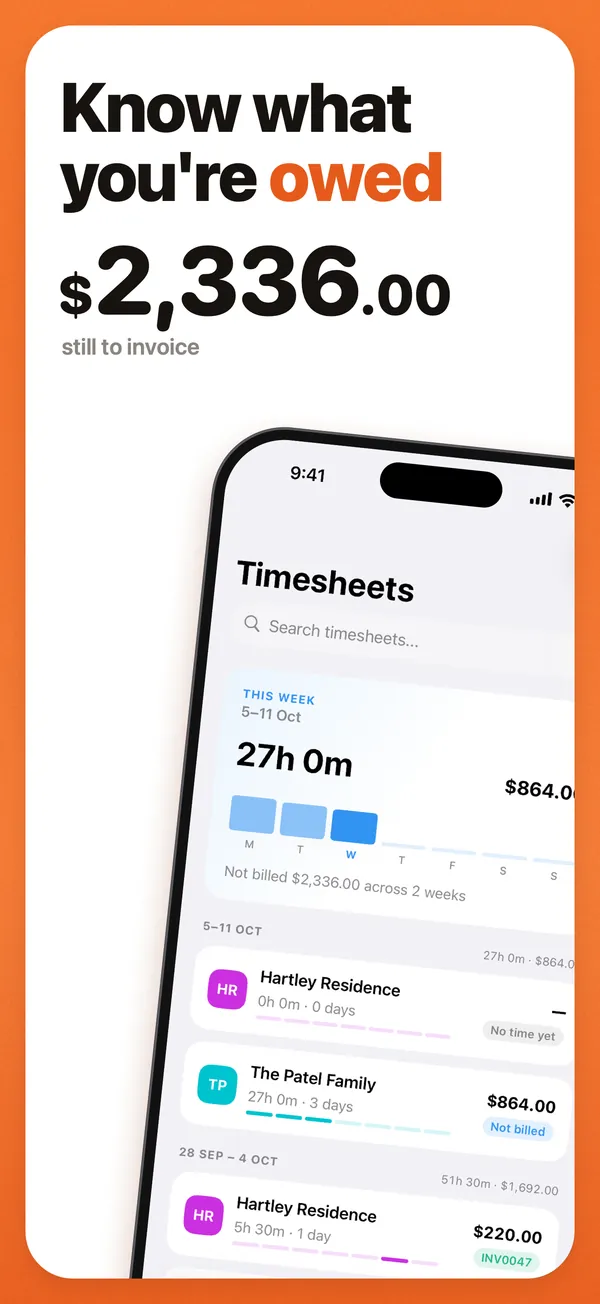
Time Card’s Money tab shows what you have earned and what is still to invoice, and Pro records each payment and shows what each client still owes.
By kind of work
What is the best app for nanny hours?
Time Card. Add each family with its rate, log arrival and finish to the minute, and on payday send the family a PDF of the week’s times, hours and what they owe. More in our nanny hours guide.
How do I track babysitting hours for several families?
Add each family as a client in Time Card with its own rate. Each family gets its own weekly total and its own PDF. Two families are free.
What is a good invoice app for cleaners?
Time Card. One client per household, each with its own rate, the clean logged on the day, and an invoice for each household weekly or monthly.
How do tutors invoice parents?
Set the lesson length as your usual shift in Time Card so each lesson is one tap, then invoice each family weekly, fortnightly or monthly from the lessons you logged.
What app should a freelancer use to bill by the hour?
Time Card, for freelancers who bill hours to a few clients. Each client has its own rate and currency, and the hours turn straight into a PDF invoice with no subscription needed.
What app should a tradie or subcontractor use?
Time Card. Log each day on site, even with no signal, and send the builder a tax invoice with your ABN and GST. See subcontractor hours to a GST invoice.
How do I track my hours on a student visa in Australia?
Log every shift in Time Card, for every job, and keep an eye on each week’s total. Add up the weeks to compare against the fortnightly work limit in your visa conditions, which the Department of Home Affairs publishes.
What app should casual workers use to track shifts?
Time Card. Log every casual shift and break on the day, see the week’s hours and pay at your rate, and check each payslip against your own record.
By country
Australia
Time Card works in Australian dollars, puts your ABN on every invoice and adds 10% GST when you are registered. Casual workers log every shift to check their payslip, and nannies, cleaners and sole traders invoice families and clients; see tracking hours in Australia.
United States
Set your rate in US dollars and log every shift. Most hourly employees are owed 1.5 times their regular rate for hours over 40 in a workweek, and Time Card’s weekly total shows straight away when you pass 40. Invoices can include sales tax for freelancers.
United Kingdom
Set your rate in pounds and log every shift and break, then compare with your payslip. Freelancers can add VAT when registered. See zero-hours and shift work.
Canada
Time Card works in Canadian dollars. Log your shifts to check each pay stub, and add GST or HST to invoices when you charge it.
New Zealand
Time Card works in New Zealand dollars and adds GST at 15% to invoices when you are registered.
About Time Card
Is Time Card the same app as Timesheet Pro?
Yes. Timesheet Pro was renamed Time Card. It is the same app on the same App Store listing, and updating keeps all your timesheets, clients and invoices.
What happens to my hours if I lose my phone?
Make a backup file in Time Card’s settings and save it to Files or iCloud Drive. On a new phone, restore it and your timesheets, clients, businesses and invoices come back.
Which languages and currencies does Time Card support?
English, Spanish and German, and 36 currencies including Australian, US, Canadian and New Zealand dollars, pounds and euros.
Is there a calculator I can use without the app?
Yes. Our free work hours calculator adds up a week or fortnight with breaks and overnight shifts. Time Card does the same every day and keeps the record.
Questions people ask
What is the best time card app for iPhone?
Time Card: Work Hours Tracker, for anyone paid by the hour. Tap a day, set start, finish and break, and it adds up your paid hours and pay. Any week becomes a PDF with every day's times for your boss or client. It works offline, needs no account, is free for two jobs and Pro can be bought once.
What is the best free app to track work hours?
Time Card. The free plan has no day limit and no watermark: unlimited days and weeks, two jobs or clients with their own rates, weekly hours and pay, and standard PDFs.
Is there a timesheet app for iPhone that works offline with no account?
Yes, Time Card. Logging hours, working out pay and making PDFs all happen on your phone with no internet connection, and it never asks you to sign up.
How do I send my boss a timesheet from my iPhone?
Log each shift in Time Card, then at the end of the week turn the week into a PDF listing each day's date, start, finish, break and hours worked with the total, and send it by email, Messages or WhatsApp.
How do I write an invoice for hours worked?
List each date, the hours, your hourly rate and the amount, then the total, your name or business, tax ID, the client's details, an invoice number, the date and payment terms. Time Card builds this from the hours you logged and makes the PDF for you.
How much does Time Card cost?
It is free for two jobs or clients with no day limit. Pro is US$0.99 or A$0.99 a month, US$6.99 or A$6.99 a year after a one-week free trial, or US$19.99 or A$19.99 once for lifetime. Other countries see their local price in the App Store.
More Time Card guides
- How to choose an hours tracker if you're paid by the hour
- Track casual hours and invoice families or clients in Australia, on your iPhone
- Nanny hours tracker: log your hours and send the family a weekly invoice
- Turn your hours into an invoice PDF on iPhone, without a subscription
- Keep your own time card to check your paycheck
- How to keep track of your work hours and pay on iPhone
- Free printable weekly timesheet (PDF), and an app that fills it in for you
- Subcontractor hours to a GST tax invoice for the builder, on your iPhone
- Zero-hours or shift work in the UK: log every shift and check your payslip
- Timesheet app for cleaners: log each house and send each client an invoice
- Babysitting hours tracker: log every sit and send the family what they owe
- Tutor invoice app: log your lessons and send parents a PDF invoice
- Work hours calculator with breaks