Turn your hours into an invoice PDF on iPhone, without a subscription
Quick answer: Use Time Card: set up each client once with their rate, log the hours after each job, and at the end of the week, fortnight or month turn them into a PDF invoice with every date, start, finish, hours, rate, total and your payment details. Standard PDF invoices are free for two clients, and Pro is a one-time purchase if you want it.
Get Time Card on the App Store Time Card hours tracker app (formerly Timesheet Pro). Free for iPhone and iPad.
The complaint on Reddit is always the same: “I track time in one app, copy it into a spreadsheet, then into an invoice template, and I forget 15 minutes here and 20 minutes there, or I mistype a rate and undercharge.” And the second complaint: “the app required a monthly subscription just to export a PDF.”
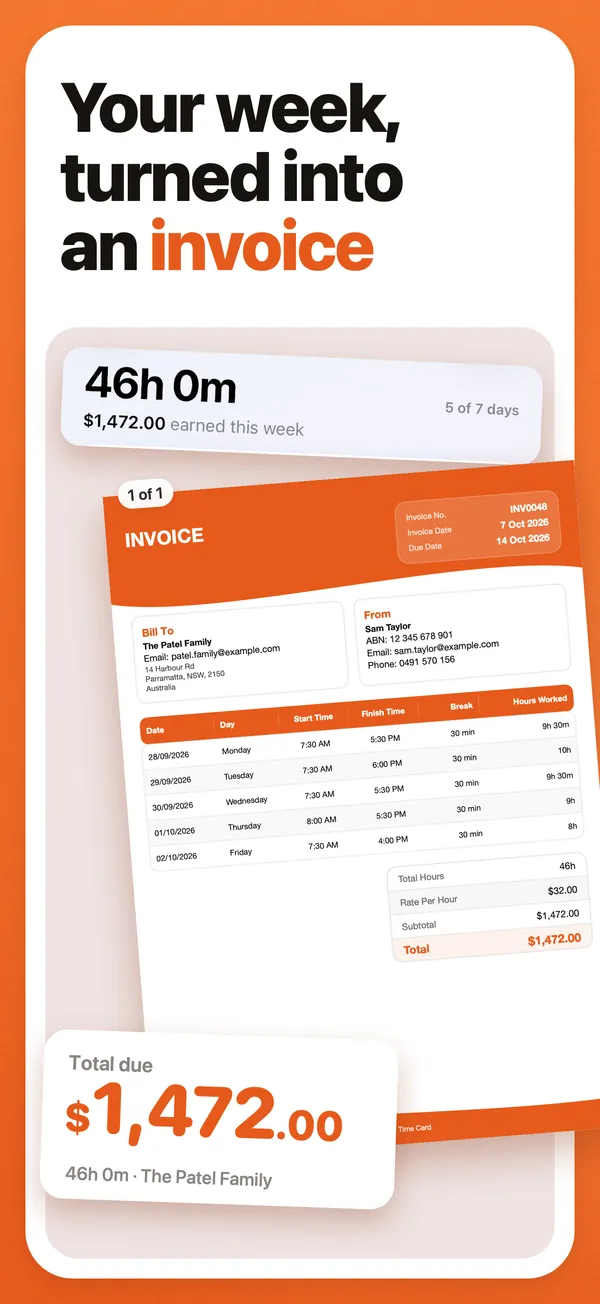
Both are solved with one habit and one app. The habit is logging the hours on the day. The app is Time Card, which we make: it keeps your clients and rates and turns the week into a PDF invoice without re-typing, free for two clients.
The three-step process
1. Set up each client once. Name, email, the rate you agreed, the currency. Put your own details in once too: business name, ABN or tax ID, bank details or payment instructions, and your default payment terms. Every invoice then carries them.
2. Log hours after each job. Tap the day, set start, finish and any unpaid break. Do it in the car before you drive off. A tutor’s 1.5-hour lesson or a cleaner’s 4-hour job takes seconds to record and a long time to reconstruct.
3. Make and send the invoice. Pick the week, or several weeks, for that client, create the invoice, check it, send the PDF, and record the payment when it lands.
What the invoice looks like
An example for a tutor, two weeks of lessons:
| Invoice | INV-0014 |
| From | Your name and your ABN |
| To | Parent’s name |
| Billing period | 1 to 15 October 2026 |
| Issued | 16 October 2026 |
| Due | 23 October 2026 (7 days) |
| Date | Description | Hours | Rate | Amount |
|---|---|---|---|---|
| 2 October | Maths tutoring | 1.5 | A$80.00 | A$120.00 |
| 9 October | Maths tutoring | 2.0 | A$80.00 | A$160.00 |
| Total due | A$280.00 |
Payment details: your bank account, PayID or other method. If you are registered for GST, the invoice shows GST and is titled “Tax invoice”. If you are not, there is no GST line and it is an invoice.
What an invoice needs
In Australia, business.gov.au lists what a tax invoice must show: that it is a tax invoice, your identity and ABN, the date, a description of what was sold, the price and the GST amount, and the buyer’s details above a certain amount. If you are not registered for GST, you issue an ordinary invoice without GST. In the United States there is no GST, so an invoice needs your name, the client’s, a number, the date, the description, the amount and the terms, with sales tax only where it applies. In the United Kingdom, VAT appears only if you are VAT-registered. This is general information, not tax advice. Time Card’s PDF carries every one of these fields.
No subscription needed
Standard PDF invoices in Time Card are free for two active clients, with your ABN or tax ID, GST, invoice number and payment terms, and no watermark. Pro adds unlimited clients, more invoice designs, payment recording and CSV export, and you can buy it once for lifetime (US$19.99 or A$19.99) or subscribe monthly or yearly if you prefer. It works offline and needs no account.
Time Card makes the invoice; it isn’t accounting software. Once you are lodging BAS or tracking expenses, you’ll also want an accounting package, and Time Card Pro’s CSV export makes the move easy.
By the kind of work you do
Tutors. Lessons come in blocks (1 hour, 1.5 hours), often weekly, billed to parents fortnightly or monthly. Set the lesson length as your usual shift so each lesson is one tap, and invoice per family.
Cleaners. Several clients at different rates, some weekly, some fortnightly. One client per household, log the clean on the day, and invoice weekly or monthly.
Freelancers with a couple of clients. Two clients are free in Time Card. Log the start and finish of each block of work, and the invoice builds itself from the hours.
Subcontractors and tradies. Log each day’s hours against the builder, then send a tax invoice with your ABN and GST at the end of the week.
Questions people ask
What is the best app to turn my hours into an invoice?
Time Card. Each client gets its own rate, you log start, finish and break after each job, and any week or run of weeks becomes a PDF invoice with your ABN or tax ID, GST, an invoice number, payment terms and every day's hours. It works offline, needs no account and is free for two clients.
Is there an invoice app with no subscription?
Yes. Time Card's standard PDF invoices are free for two clients, and Pro is available as a one-time lifetime purchase: US$19.99 or A$19.99 once. Monthly and yearly plans are there if you prefer.
Can I make an invoice from my hours without accounting software?
Yes. For clients you bill by the hour, Time Card makes the invoice straight from the hours you logged, with no re-typing into a template and no accounting setup.
Do I need an ABN or GST on my invoice?
In Australia, an invoice should carry your ABN if you have one, and GST only if you are registered for GST. Without GST registration you issue an invoice, not a tax invoice, and you do not add 10%. Time Card adds GST only when you turn it on. business.gov.au sets out the requirements. Other countries have their own rules on tax IDs and VAT.
Can I make a GST invoice for a builder as a subcontractor?
Yes. Log your daily hours against the builder in Time Card, then send a PDF tax invoice with your ABN, GST, an invoice number, payment terms and each day's hours.
Can I record payments?
Yes. Time Card Pro records payments against each invoice and shows what has been paid and what is still owed.
What if a client questions my hours?
Every Time Card invoice lists each day with its start, finish and break, so the client sees exactly where the hours came from. Logging hours on the day, rather than reconstructing them at month end, is what makes that record believable.
More Time Card guides
- How to choose an hours tracker if you're paid by the hour
- Track casual hours and invoice families or clients in Australia, on your iPhone
- Nanny hours tracker: log your hours and send the family a weekly invoice
- Keep your own time card to check your paycheck
- How to keep track of your work hours and pay on iPhone
- Free printable weekly timesheet (PDF), and an app that fills it in for you
- Subcontractor hours to a GST tax invoice for the builder, on your iPhone
- Zero-hours or shift work in the UK: log every shift and check your payslip
- Tracking work hours, pay, timesheets and invoices on iPhone: 50 questions answered
- Timesheet app for cleaners: log each house and send each client an invoice
- Babysitting hours tracker: log every sit and send the family what they owe
- Tutor invoice app: log your lessons and send parents a PDF invoice
- Work hours calculator with breaks