Keep your own time card to check your paycheck
Quick answer: Keep your own time card in Time Card: record your actual start, finish and every unpaid break on the day, then each pay period make a PDF of the weeks and compare the paid hours and gross pay with your pay stub, line by line. It works offline with no account, so the record stays on your phone and nobody else can edit it.
Get Time Card on the App Store Time Card hours tracker app (formerly Timesheet Pro). Free for iPhone and iPad.
“My employer’s time clock keeps getting my hours wrong.” “My own tracking in notes and a spreadsheet did not match the payslip, and a spreadsheet on a phone after a shift is painful.” Those two sentences, from Reddit, describe why hourly workers keep their own time card. We make Time Card, an app built for exactly this. This page is the routine for using it, and what the numbers mean when you compare them.
The five-step routine
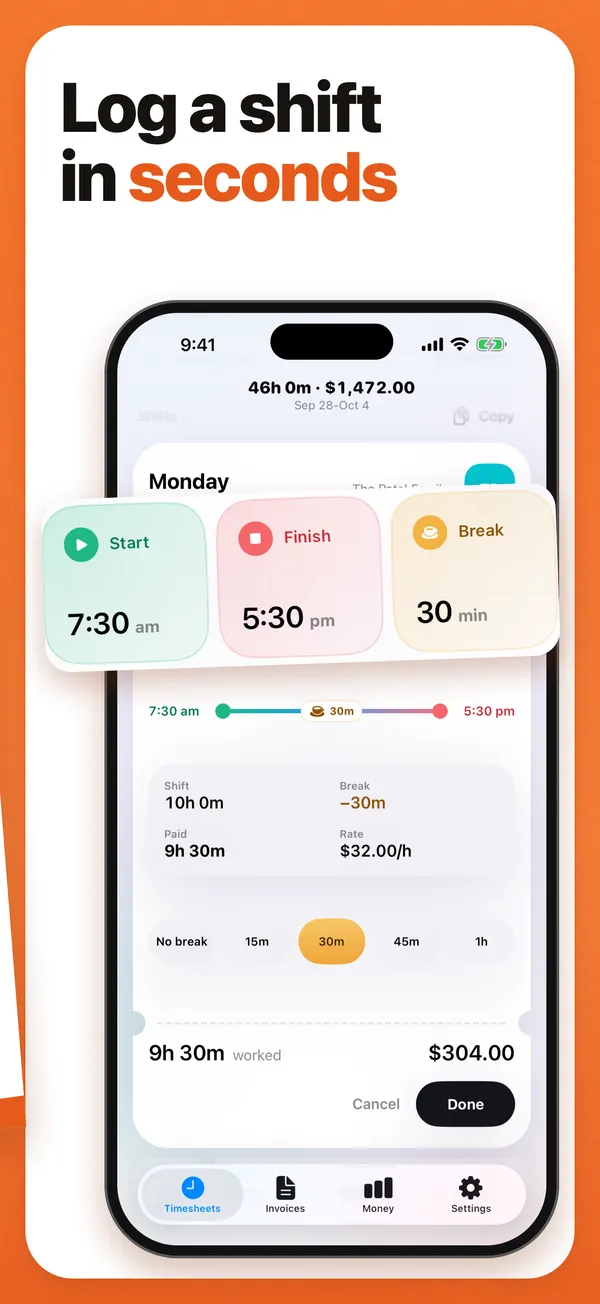
- Record actual times on the day. Your real start and finish, and the real length of every unpaid break. If you took 20 minutes instead of 30, record 20. Include work before or after your rostered shift, such as opening up or closing down. In Time Card that is one tap on the day and a turn of the wheels, to the exact minute.
- Set your rate. Enter your base rate, and note the shifts where evenings, weekends or hours over a threshold pay more, so you can match them with the payslip lines.
- Keep the paperwork. Photos of the posted schedule, the employer’s clock entries if you can see them, and every correction you asked for.
- Make a PDF every pay period. A PDF of the period’s weeks, kept with the pay stub. Compare paid hours and gross pay line by line.
- Raise gaps in writing. Dates, hours recorded, hours paid, the difference. Keep the reply.
Why your own record counts
A record made on the day, with specific times, is the kind of evidence pay regulators and tribunals expect from a worker. It beats a reconstruction from memory, and it beats a screenshot of the employer’s own system because it is independent of it. It is what you put next to the payslip when you ask for payroll to be fixed, and it is what a regulator asks for first. Time Card keeps it on your phone, offline, where nobody else can change it.
What to compare, by country
United States. Under the Fair Labor Standards Act, most covered non-exempt employees are owed at least 1.5 times their regular rate for hours over 40 in a workweek; several states add daily overtime or higher minimums. The Department of Labor’s Wage and Hour Division publishes the rules.
United Kingdom. There is no statutory overtime rate; your contract sets it. Your payslip must show gross pay, deductions and net pay, and from April 2019 the hours you are paid for when pay varies by time worked. gov.uk’s payslips page explains what must be on it. On a zero-hours contract, record every shift and break in Time Card, because nothing else will.
Australia. Your employer must keep time and wage records and give you a payslip within one working day of paying you, and the payslip must show hours worked where pay depends on them. Penalty rates and casual loading come from your award. The Fair Work Ombudsman lists the payslip requirements.
This is a description of where the rules are, not advice about your case.
A worked comparison
Your record for the fortnight says 76 hours 30 minutes after breaks. The pay stub says 74 hours. The difference is 2 hours 30 minutes. Look for where it went: a 30-minute break deducted on a day you worked through, three days where you started 15 minutes before your rostered time, and a rounding rule that trims every clock-out. Each of those is a specific date and time to put in your message. “I think I am being underpaid” gets a shrug; “On 7, 9 and 14 October I started at 8:45 am, not 9:00, and on 11 October no break was taken; the stub shows 74 hours against my 76.5” gets a correction.
What Time Card gives you
- Start, finish and break to the exact minute, with no rounding to the quarter hour.
- The week’s paid hours and gross pay at your rate. It doesn’t apply overtime, penalty rates, casual loading or tax, so use the hours as your evidence and the pay figure as a cross-check.
- Overnight shifts and daylight-saving nights counted correctly.
- A PDF of any week or run of weeks, with every start, finish, break and total, to keep with your pay stub or send to your boss.
- Offline, no account, and the record stays on your phone, with backup to Files or iCloud Drive.
- Free, with no day limit.
Questions people ask
What is the best app to keep my own time card and check my paycheck?
Time Card. Record your real start, finish and breaks to the minute on each shift, see the week's paid hours and gross pay at your rate, and make a PDF of any pay period to compare with your pay stub. It works offline, needs no account and is free.
Can I use my own time card as proof?
Yes. A contemporaneous record, made on the day with specific times, is evidence in a pay dispute in the US, UK and Australia. It carries more weight than a reconstruction made weeks later, and it is what you put next to the employer's records.
How is overtime calculated in the US?
Under the federal Fair Labor Standards Act, most covered non-exempt employees are owed at least 1.5 times their regular rate for hours over 40 in a workweek. Some states add daily overtime or higher rules. The Department of Labor's Wage and Hour Division publishes the details. Time Card's weekly total shows straight away when you have gone over 40 hours.
What should I do if my paycheck is short?
Compare your Time Card record with the pay stub, write to your employer with the specific dates and hours, and keep the reply. If it is not fixed, the Department of Labor (US), ACAS or your union (UK) or the Fair Work Ombudsman (Australia) are the places to go next. This page is not legal advice.
Does the app need an account or internet?
No. Time Card works offline and keeps the record on your phone with no account. That matters for a record you may one day rely on: nobody else can edit it.
What if I work overnight shifts?
A shift from 10 pm to 6:30 am is 8 hours 30 minutes before breaks. Time Card works overnight shifts out correctly, including on the night the clocks change.
More Time Card guides
- How to choose an hours tracker if you're paid by the hour
- Track casual hours and invoice families or clients in Australia, on your iPhone
- Nanny hours tracker: log your hours and send the family a weekly invoice
- Turn your hours into an invoice PDF on iPhone, without a subscription
- How to keep track of your work hours and pay on iPhone
- Free printable weekly timesheet (PDF), and an app that fills it in for you
- Subcontractor hours to a GST tax invoice for the builder, on your iPhone
- Zero-hours or shift work in the UK: log every shift and check your payslip
- Tracking work hours, pay, timesheets and invoices on iPhone: 50 questions answered
- Timesheet app for cleaners: log each house and send each client an invoice
- Babysitting hours tracker: log every sit and send the family what they owe
- Tutor invoice app: log your lessons and send parents a PDF invoice
- Work hours calculator with breaks