Nanny hours tracker: log your hours and send the family a weekly invoice
Quick answer: Use Time Card: add the family with your hourly rate, log the exact minute you arrive and leave each day, and on payday send the family a PDF showing each day's times, the hours, your rate and the total owing. It works offline with no account and is free for two families.
Get Time Card on the App Store Time Card hours tracker app (formerly Timesheet Pro). Free for iPhone and iPad.
Nanny hours go wrong in small ways. The nanny is ten minutes late three mornings a week and stays ten minutes late on two evenings, and nobody writes any of it down. The family pays partly in cash and loses track. An app rounds every finish up to the quarter hour. By the end of the month, both sides feel short-changed, and the r/Nanny threads about it run to dozens of comments.
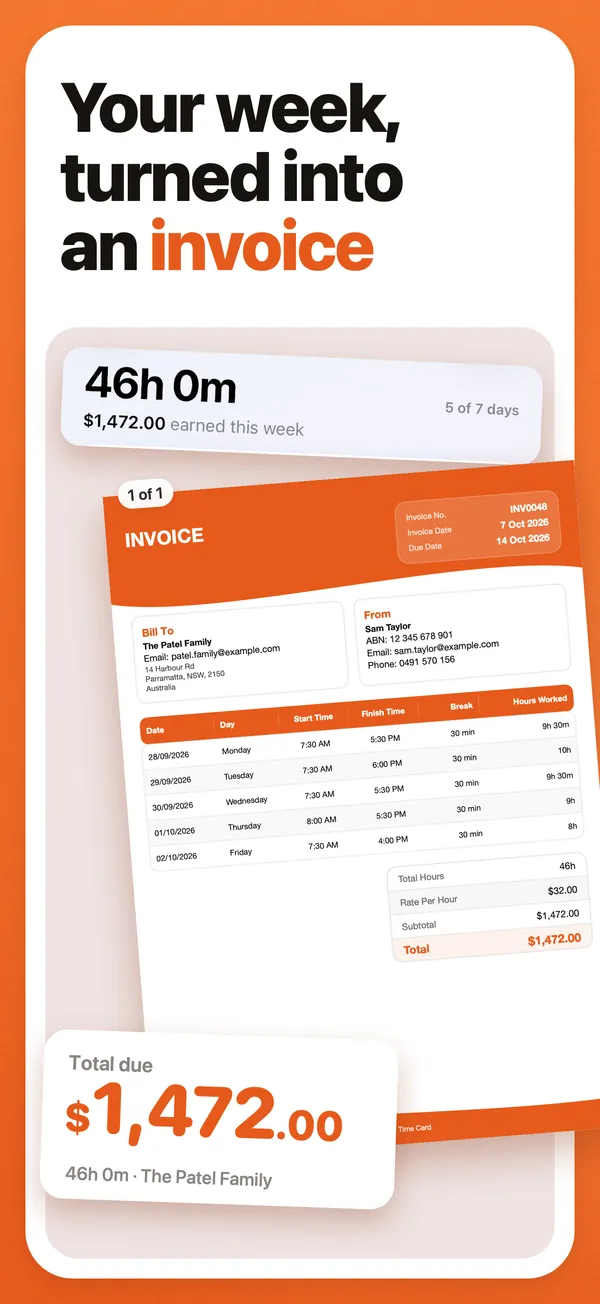
The fix is the same whichever side you are on: exact times, recorded the same day, and a weekly summary sent before payday. Time Card, our app, does all three: it keeps the exact minutes, adds up the week at your rate, and makes the PDF you send.
For nannies: what to send the family each week
A weekly summary should show each day you worked, when you arrived and left, any unpaid break, the hours, your rate and the total owing. A nanny on r/Nanny put it well: she sends an invoice that includes the exact times she arrived and asks the family to double-check it before paying. That one habit removes most arguments, and it is exactly the PDF Time Card makes.
Here is what a week looks like. The figures are an example.
| Day | Arrived | Left | Unpaid break | Paid hours |
|---|---|---|---|---|
| Monday 12 October | 7:55 am | 3:10 pm | none | 7 h 15 min |
| Tuesday 13 October | 8:00 am | 3:00 pm | none | 7 h 00 min |
| Wednesday 14 October | 8:05 am | 6:20 pm | 30 min | 9 h 45 min |
| Thursday 15 October | 8:00 am | 3:00 pm | none | 7 h 00 min |
| Friday 16 October | 7:58 am | 1:30 pm | none | 5 h 32 min |
| Total | 36 h 32 min (36.53 h) | |||
| Rate | A$35.00 an hour | |||
| Total owing | A$1,278.67 |
Decimal hours matter when the family pays through a payroll service, so show both.
For families: the record to pay against
Families on r/NannyEmployers try texts saying “in” and “out”, a shared note or a spreadsheet. They all leave someone adding up the week by hand, usually at 6 pm with a toddler on their hip. A daily text works for a week or two; once rates or hours vary, Time Card does the adding up for you. The simplest setup is Time Card on the nanny’s phone and the PDF sent to you weekly. The app does the adding up and keeps exact minutes, and the weekly PDF is the thing you pay against. You see the summary, not the app.
Write down the rules once: the rate, guaranteed hours if you pay them, how a late arrival or a late finish is treated, and whether you round. Then apply them the same way in both directions. Most of the disputes on Reddit are about rules nobody agreed.
Why nannies use Time Card
- Exact minutes. Arrival and finish to the minute on the wheels, with no rounding to the quarter hour.
- One family or several. Each family is a client with its own rate. Two are free; Pro adds unlimited families.
- The week adds itself up. Paid hours after breaks, and what the family owes at your rate.
- A PDF the family can check. Every day’s times, the hours, the rate and the total, sent by Messages, WhatsApp or email.
- Late finishes and overnights. A shift that runs past midnight counts correctly, even on the night the clocks change.
- Private. Works offline, no account, and nothing about the family or the children leaves your phone.
- What is still owed. Pro records each payment and shows what the family still owes.
How to do it in Time Card
- Add the family as a client and enter the hourly rate. Add a second family if you have one; two are free.
- Each day, tap the date and set arrival, finish and any unpaid break on the wheels. An empty day opens with your usual hours filled in.
- On your pay day, open the week, check the hours, and tap to make the PDF.
- Send it by Messages, WhatsApp or email, and keep a copy. When the family pays, Pro can mark it as paid and show what is still owed.
The employment side, briefly
In Australia, a family that employs a nanny has record-keeping and pay obligations; the Fair Work Ombudsman sets them out. In the United States, a family that pays a nanny above the annual threshold is a household employer with payroll-tax obligations, and overtime at 1.5 times the regular rate generally applies over 40 hours a week; the Department of Labor has the details. This is general information, not advice for your situation. Time Card is not a payroll service: it keeps the hours and makes the weekly PDF, but it doesn’t pay wages, withhold tax or lodge anything for the family. What it does is keep the hours and the money clear for both sides.
Questions people ask
What is the best app to track nanny hours?
Time Card. Add each family as a client with its own rate, tap each day to set arrival, finish and any unpaid break to the minute, and on payday send the family a PDF of the week's times, hours and total owing. It works offline, needs no account and is free for two families.
What is the easiest way to track nanny hours?
Log the day in Time Card before you leave the house: one tap opens the day with your usual hours filled in, and you adjust the minutes. The app adds up the week at your rate, so there is nothing to work out from texts or notes on payday.
How do I bill a family for overtime?
Agree in advance what counts as overtime and the rate. Time Card shows each day's hours and the week's total, so the hours over your agreed threshold are easy to see and bill at the overtime rate. In the United States, household employees are generally owed 1.5 times their rate over 40 hours a week under federal law; check the Department of Labor's guidance for your state.
Should a nanny send an invoice or a timesheet?
Time Card's weekly PDF covers both: it lists each day's start, finish, break and hours like a timesheet, and adds your rate and the total owing like an invoice. If the family employs you and pays wages, it is your record of hours; if you charge the family yourself, it is your invoice.
Does Time Card need an account or internet?
No. It works offline and keeps the record on your phone. Nothing you enter about the family or the children is uploaded to us.
What about rounding to the quarter hour?
Some apps round every clock-out to the nearest 15 minutes, which adds up: four days of finishing one minute late becomes an extra hour. Time Card records the actual minute, so the family pays for exactly the time worked.
More Time Card guides
- How to choose an hours tracker if you're paid by the hour
- Track casual hours and invoice families or clients in Australia, on your iPhone
- Turn your hours into an invoice PDF on iPhone, without a subscription
- Keep your own time card to check your paycheck
- How to keep track of your work hours and pay on iPhone
- Free printable weekly timesheet (PDF), and an app that fills it in for you
- Subcontractor hours to a GST tax invoice for the builder, on your iPhone
- Zero-hours or shift work in the UK: log every shift and check your payslip
- Tracking work hours, pay, timesheets and invoices on iPhone: 50 questions answered
- Timesheet app for cleaners: log each house and send each client an invoice
- Babysitting hours tracker: log every sit and send the family what they owe
- Tutor invoice app: log your lessons and send parents a PDF invoice
- Work hours calculator with breaks