How to keep track of your work hours and pay on iPhone
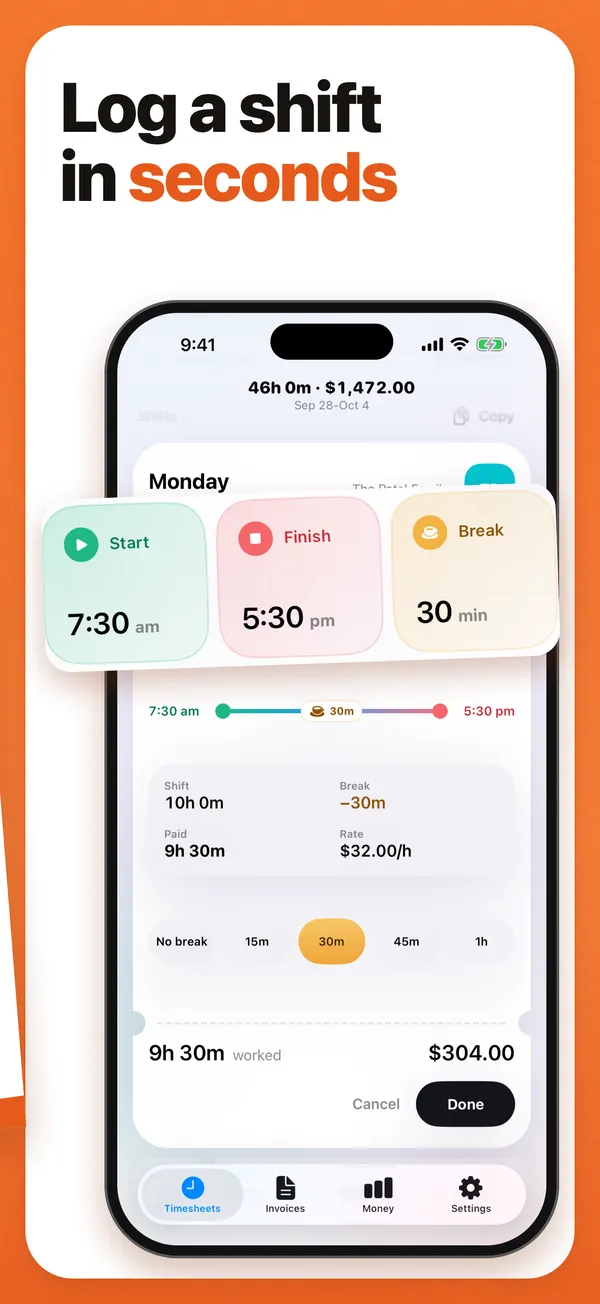
Quick answer: Use Time Card on your iPhone. After each shift, set your start, finish and unpaid break on the wheels, and it adds up your paid hours and your pay for the week at your hourly rate. At the end of the week, send your boss or client a PDF with every day's times. It is free for two jobs, works offline and needs no account.
Get Time Card on the App Store Time Card hours tracker app (formerly Timesheet Pro). Free for iPhone and iPad.
Most people who get paid by the hour keep track of their hours somewhere: a notes app, a calendar, a spreadsheet, the back of a receipt. The trouble starts on payday, when the hours have to be added up, breaks taken off and the total checked against the payslip or turned into an invoice. Time Card, which we make, does that adding up as you go.
Why keep your own record of your hours
- To check your pay. A record made on the day, with the real start and finish times, is what you compare with your payslip or paycheck.
- To get paid for every minute. Ten minutes here and there add up to hours over a month.
- To bill clients accurately. If you invoice families or clients, the invoice should match the hours you actually worked.
- As evidence. If your hours are ever disputed, a record made at the time carries far more weight than one rebuilt from memory.
What Time Card does with your hours
- Start, finish and break for each day, set on wheels to the exact minute, with no rounding to the quarter hour.
- Paid hours after unpaid breaks, the week’s total and your gross pay at your hourly rate.
- Overnight shifts counted correctly, even on the night the clocks change.
- A PDF of any week, or several weeks, with each day’s date, start, finish, break and hours, plus your rate and the total.
- Invoices with your business name, ABN or tax ID, GST, VAT or sales tax, an invoice number and payment terms, for the clients you bill.
- Copy a day, repeat last week, and reminders to log your hours.
- Works offline, needs no account, and keeps your records on your iPhone or iPad, with backup to Files or iCloud Drive.
Notes app, spreadsheet or Time Card
A note or a text to yourself is quick, but someone still has to add it all up on payday. A spreadsheet adds it up, but it is painful to fill in on a phone after a long shift. Time Card is as quick as a note and adds up like a spreadsheet: one tap opens the day with your usual shift filled in, you adjust the minutes, and the week is done.
For each kind of work
- Casual and part-time workers: log every shift and break, and check each payslip against your own record.
- Nannies and babysitters: one client per family, exact arrival and finish times, and a weekly PDF of what each family owes.
- Cleaners: one client per household, each with its own rate and invoice.
- Tutors: log every lesson and invoice parents weekly or monthly.
- Freelancers and contractors: hours straight into a PDF invoice, with no subscription needed.
- Tradies and subcontractors: daily hours against each builder, then a tax invoice with your ABN and GST.
- Students working part time: a running total of your hours each week, to keep an eye on your visa’s work limit.
Your record stays yours
Time Card works without an internet connection and never asks you to sign up. Your hours, clients and invoices stay on your phone, and you can back them up to Files or iCloud Drive whenever you like. Nobody else can edit your record.
Questions people ask
What is the best app to keep track of my work hours?
Time Card. You log start, finish and break for each shift in a couple of taps, and it adds up your paid hours and pay for the week. Any week becomes a PDF for your boss or client. It works offline, needs no account and is free for two jobs.
Is there a free app to track work hours and pay?
Yes. Time Card's free plan has no day limit: unlimited days and weeks, two jobs or clients with their own rates, weekly hours and pay, and standard PDFs with no watermark.
Can I track hours for two jobs?
Yes. Add each job in Time Card with its own hourly rate and currency. Each job's hours and pay are added up separately, and two jobs are free.
Is an app better than a spreadsheet for tracking hours?
On a phone, yes. A spreadsheet is fiddly to fill in after a shift and easy to get wrong when breaks or overnight shifts come up. Time Card takes a couple of taps per shift, subtracts breaks, counts overnight shifts correctly and adds up the week for you.
How do I keep track of hours for a fortnightly pay period?
Log each shift in Time Card as usual. Each week shows its own total, and one PDF can cover both weeks of the pay period, so you can check the fortnight against your payslip in one go.
More Time Card guides
- How to choose an hours tracker if you're paid by the hour
- Track casual hours and invoice families or clients in Australia, on your iPhone
- Nanny hours tracker: log your hours and send the family a weekly invoice
- Turn your hours into an invoice PDF on iPhone, without a subscription
- Keep your own time card to check your paycheck
- Free printable weekly timesheet (PDF), and an app that fills it in for you
- Subcontractor hours to a GST tax invoice for the builder, on your iPhone
- Zero-hours or shift work in the UK: log every shift and check your payslip
- Tracking work hours, pay, timesheets and invoices on iPhone: 50 questions answered
- Timesheet app for cleaners: log each house and send each client an invoice
- Babysitting hours tracker: log every sit and send the family what they owe
- Tutor invoice app: log your lessons and send parents a PDF invoice
- Work hours calculator with breaks