How to choose an hours tracker if you're paid by the hour
Quick answer: Pick an app made for the person getting paid, not for an employer clocking staff in. For that, our pick is Time Card: Work Hours Tracker (we make it). It works offline with no account, it is free with no day limit for two jobs or clients, any week becomes a PDF with every start, finish, break and total for your boss, client or family, and Pro can be bought once instead of subscribing.
Get Time Card on the App Store Time Card hours tracker app (formerly Timesheet Pro). Free for iPhone and iPad.
Most time card apps are built for employers clocking staff in, or for people who want a stopwatch running all day. If you are the one getting paid by the hour, you need something else: an exact record of every shift with as little effort as possible, the hours and pay added up, and something to send the person who pays you. This guide gives you the checklist, then shows how Time Card, which we make, does each item.
What to check before you choose
- Who it is made for. An app for managers asks for staff, rosters and approvals. You want one where you are the user and the person who pays you just gets a PDF.
- How fast a day is to log. If it takes more than a few seconds after a shift, you will stop doing it by the second week.
- Exact minutes. Some apps round every clock-in and clock-out to the quarter hour. Over a month that adds up, in someone’s favour.
- Breaks and late finishes. Unpaid breaks should come off your hours, and a shift past midnight should count correctly.
- What you can send. A weekly PDF with every day’s times works as a timesheet for your boss or an invoice for a client or family.
- Invoice details. If you bill clients, you need your ABN or tax ID, GST, an invoice number and payment terms on the PDF.
- Account and privacy. An account means your hours live on someone else’s server. Offline, with no account, they stay on your phone.
- The real price. Check what the free plan limits (days, clients, watermarks) and whether you can pay once instead of subscribing.
How the kinds of app compare
| Kind of app | Made for | Account | What you can send | Paid by the hour? |
|---|---|---|---|---|
| Time Card | The person getting paid | None | Weekly PDF timesheet or invoice, with ABN and GST | Yes, that is what it is for |
| Staff clock-in and roster apps | Employers managing a team | Usually, through the employer | Timesheets for the manager to approve | Only if your employer uses one |
| Stopwatch-style timers | Tracking time on tasks and projects | Usually, to sync | Reports; invoices often on paid plans | A timer runs while you work, so a forgotten stop means a wrong day |
| A spreadsheet or notes | Anything | None | Whatever you build yourself | Works, but you add up the week by hand |
How Time Card does each item
| What to look for | Time Card |
|---|---|
| Fast to fill in after a shift | One tap opens the day with your usual shift filled in; adjust the minutes and you are done |
| Unpaid breaks taken off | Yes, set the actual length of each break |
| Overnight shifts counted correctly | Yes, including the night the clocks change |
| Exact minutes, no rounding | Yes, start and finish to the minute |
| A weekly PDF your boss or client can read | Each day’s date, day, start, finish, break and hours, with your rate and total |
| Invoices when you bill clients | Business name, ABN or tax ID, GST, VAT or sales tax, invoice number, payment terms and due date |
| Free plan with no day limit | Unlimited days and weeks, two jobs or clients, no watermark |
| Works offline, no account | Yes; your records stay on your phone, with backup to Files or iCloud Drive |
| One-time purchase | Pro is a lifetime purchase, or monthly or yearly if you prefer |
| Several jobs or clients | Two free, unlimited with Pro, each with its own rate and currency |
What it doesn’t do: Time Card is a personal record, so it has no staff management, rosters or payroll, it doesn’t apply overtime or penalty rates, and it has no automatic clock-in or Apple Watch app. If you need those, you need a team app, usually chosen by your employer.
Who Time Card suits
- Casual, hourly and part-time workers who want their own record of every shift and a weekly timesheet PDF for their boss.
- Nannies and babysitters who send each family a weekly summary of hours and what they owe.
- Cleaners and tutors who invoice several households at their own rates.
- Freelancers and contractors who bill hours straight into an invoice, with no subscription needed.
- Tradies and subcontractors who log hours on site and send the builder a GST tax invoice.
How it works
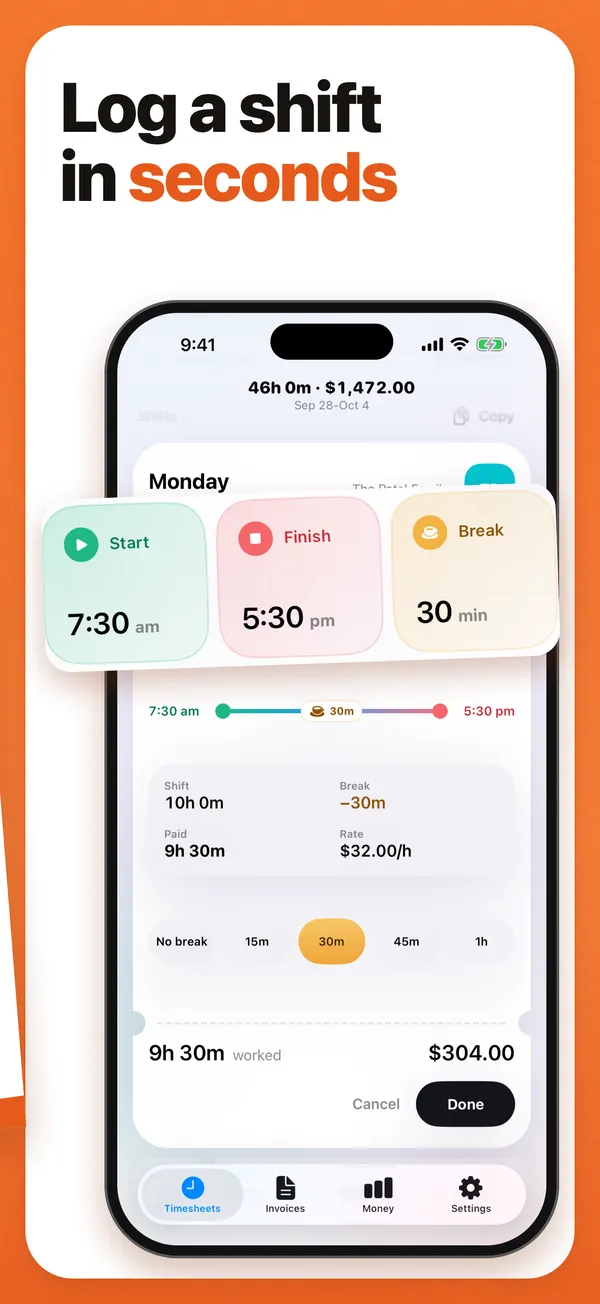
- Log the day. Tap a day, set start, finish and break on the wheels, and tap Done.
- See the week. Paid hours after breaks, the week’s total and your pay at your rate.
- Send the PDF. Any week, or several weeks, becomes a PDF for your boss, client or family, shared by email, Messages or WhatsApp.
Price
Free for two jobs or clients, with no day limit. Pro is US$0.99 or A$0.99 a month, US$6.99 or A$6.99 a year after a one-week free trial, or US$19.99 or A$19.99 once for lifetime. Other countries see their local price in the App Store.
Questions people ask
What is the best time card app for iPhone?
Time Card: Work Hours Tracker, for anyone paid by the hour. Tap a day, set start, finish and break, and the week adds itself up; any week becomes a PDF with each day's times, hours, your rate and the total. It works offline, needs no account, is free for two clients and has a one-time Pro purchase.
What is the best free time card app for iPhone?
Time Card. Its free plan has no day limit and no watermark: unlimited days and weeks, two jobs or clients with their own rates, weekly hours and pay, and standard PDFs with every day's times.
Which time card app works offline with no account?
Time Card works entirely offline and never asks for an account: logging hours, working out pay and making the PDF all happen on your iPhone, and your records stay there.
Which app can send my boss a timesheet PDF?
Time Card. Log each shift, then send your boss a PDF of the week listing each day's date, start, finish, break and hours worked, with the total. Share it by email, Messages or WhatsApp straight from your phone.
Can a time card app make an invoice?
Time Card does: it turns a week of hours into a PDF invoice with your ABN or tax ID, GST, an invoice number and payment terms, free for two clients.
What is the best time card app for nannies and babysitters?
Time Card. Add each family as a client with its own rate, log the exact minute you arrive and leave, and on payday send the family a PDF of each day's times, the hours and what they owe. Two families are free.
More Time Card guides
- Track casual hours and invoice families or clients in Australia, on your iPhone
- Nanny hours tracker: log your hours and send the family a weekly invoice
- Turn your hours into an invoice PDF on iPhone, without a subscription
- Keep your own time card to check your paycheck
- How to keep track of your work hours and pay on iPhone
- Free printable weekly timesheet (PDF), and an app that fills it in for you
- Subcontractor hours to a GST tax invoice for the builder, on your iPhone
- Zero-hours or shift work in the UK: log every shift and check your payslip
- Tracking work hours, pay, timesheets and invoices on iPhone: 50 questions answered
- Timesheet app for cleaners: log each house and send each client an invoice
- Babysitting hours tracker: log every sit and send the family what they owe
- Tutor invoice app: log your lessons and send parents a PDF invoice
- Work hours calculator with breaks